
On the air in four steps.
You need an Android phone or tablet, or supported hardware, and an account on the User Portal.
What you get, account by account.
You need an account to use the app, because it pairs to your account. A free account includes network voice on every mode. A subscription adds memory sync, the live call log, Community, Satellites, Propagation, repeater edits and personal support from our team.
| Feature | Free account | Subscription: $10/month |
|---|---|---|
| Radio-module FM (on a supported radio)Needs only a paired device. | Included | Included |
| Radio-module DMR (on a supported radio)Works without a subscription once your callsign is verified. | †Included, needs a verified callsign | †Included, needs a verified callsign |
| Network voice: DMR, D-STAR, System Fusion, P25 and M17 over the internet, with the maintained server and talkgroup listsFree. | Included | Included |
| Repeater directory: browse, search and tune | Included | Included |
| Repeater directory: report a removal that looks wrong | Not included | Included |
| Repeater directory: add and correct repeaters, add talkgroupsCommunity edits. | Not included | †Included, needs a verified callsign |
| Memories: view the memories in your account | Included | Included |
| Caller names and cities from the DMR ID database kept on your deviceFree. | Included | Included |
| Memories: create, edit and sync across your devices | Not included | Included |
| Call log with live names, locations, distance and maps; calling back from the log | Not included | Included |
| Community: who is on, friends, alerts and the map | Not included | Included |
| Satellite tracking and pass alerts | Not included | Included |
| Propagation and local weather | Not included | Included |
| Send contacts to your own QRZ LogbookUses your own QRZ account and API key, which you add in the portal. | Not included | †Included, needs a verified callsign |
| Personal support from our team (help tickets in your account) | Not included | Included |
| Themes, text size, High Visibility and the tablet layout | Included | Included |
| Keeps the coffee brewing in the dev shack ☕ | Not included | Included |
| 73 from the whole team | Included | Included |
† Needs a verified callsign and DMR ID on your account, checked when you register. You can add them from your profile at any time. Radio-module features need a radio with an RF module that the app supports.
Program your radios from your phone or browser. No codeplugs, no cables, no software. Building and syncing your channels is one of the best things a subscription adds.
A subscription, about the price of a cup of coffee each month, also supports the ongoing development of Unified Radios, and we greatly appreciate it. 73!
Start your 14-day free trial
Network voice is free. Every new account also gets 14 days of everything a subscription adds: memory sync, the live call log with maps, Community, Satellites, Propagation, repeater edits, QRZ Logbook uploads and personal support. No card is needed to start. The features marked † also need your verified callsign.
- Register with your callsign and DMR ID, which we check when you sign up. You can also register without a callsign to get started with limited features, and add it later.
- One free trial per callsign and DMR ID.
- Payment is asked for only if you choose to subscribe. Subscribing needs a callsign and DMR ID linked to your account.
- When the trial ends, you keep your free account, including network voice, until you subscribe ($10/month).
Simple and secure
- No account password to remember. You sign in with a one-time link or code sent to your email.
- We never see or store your card details. Payments are handled by Stripe, a trusted payment provider, on their secure checkout.
Create your account
Register on the User Portal with your callsign and email. Your callsign and DMR ID are checked when you sign up. Without a callsign you get limited features, and you can add it later.
Get the app
Open the download page on your Android device and install Unified Radios.
Pair your device
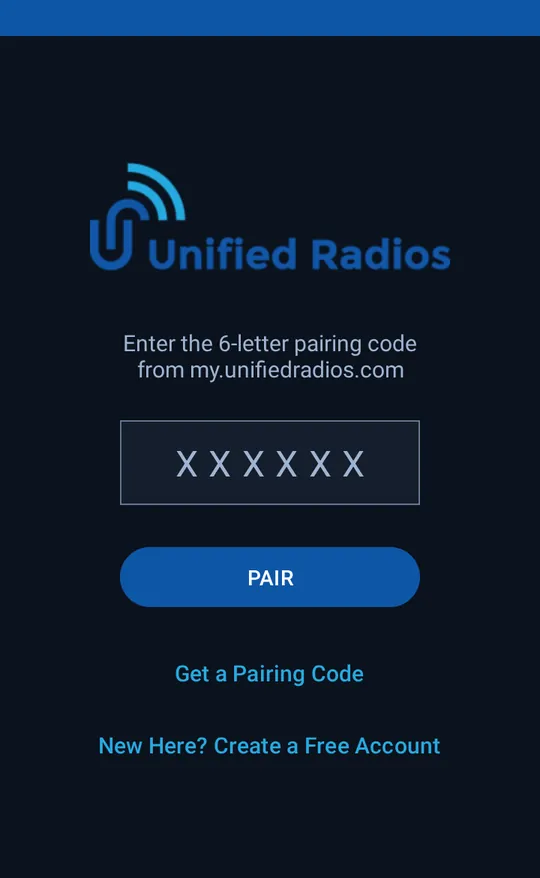
In the portal, get a six-letter pairing code for your device, then enter it in the app (or open the pairing link).
Pick a network and talk
Choose a network, a server and a talkgroup from the lists. Press Push to Talk. Network voice is free.
The app walks you through it.
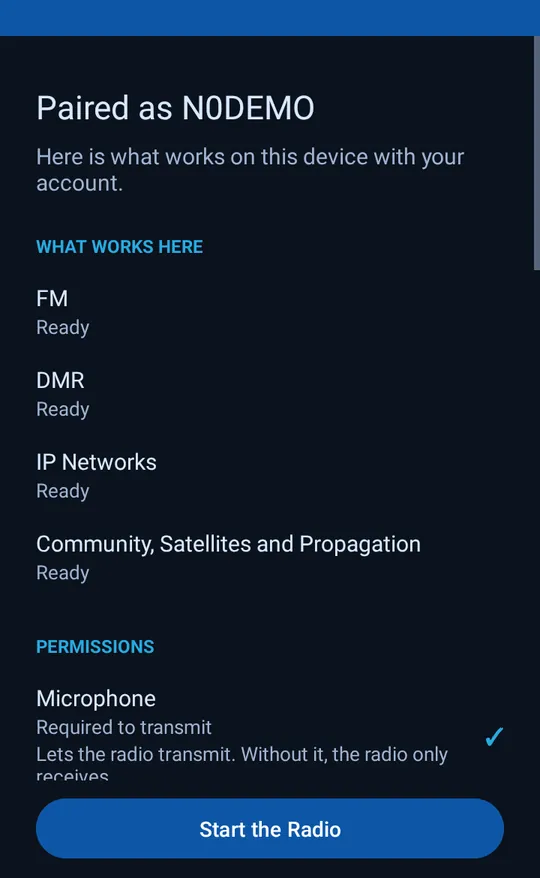
After you pair, the app shows what works on your device with your account, asks only for the permissions it needs (the microphone to transmit, location for repeaters and satellite passes, notifications for calls and passes) and explains why.
Good to know.
Do I need a hotspot?
No. Network voice is free and works straight from the app. FM and DMR over the air need a radio with an RF module that the app supports.
What does it cost?
An account is free, and network voice on every mode is free. A subscription ($10/month) adds memory sync, the live call log with names and maps, Community, Satellites, Propagation, repeater edits, QRZ Logbook uploads and personal support from our team. Every new account starts with a 14-day free trial of those extras. Subscribing also helps support ongoing development, for about the price of a cup of coffee each month, and is greatly appreciated. See the plans table above.
Is it simple and secure?
Yes. There is no account password to remember: you sign in with a one-time link or code sent to your email. We never see or store your card details. Payments are handled by Stripe, a trusted payment provider, on their secure checkout.
Do I need an amateur radio license?
The service is intended for licensed amateur radio operators. Radio-module DMR, editing the repeater directory and sending contacts to QRZ need a verified callsign and DMR ID.
Do all networks work with just my account?
Some networks ask for your own account or password with that network. Save it in the User Portal and the app uses it.
Which devices are supported?
Standard Android phones and tablets, and radios running Android with a supported RF module. The app works from small handhelds up to ten-inch tablets.
Where is the repeater directory?
In the app under Repeaters. Browsing is free.